Content writing
Write SEO content in your brand’s voice, with sources.
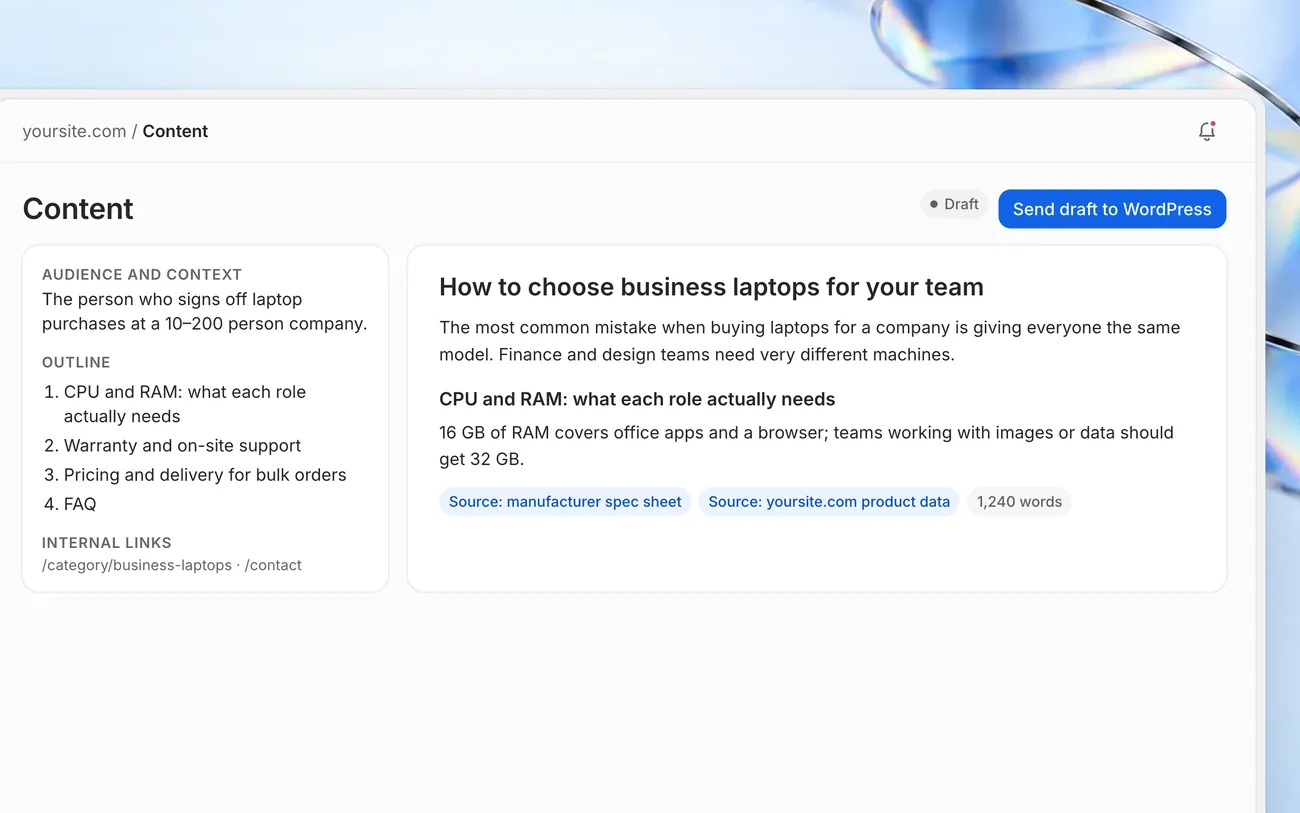
Pick a topic and Marvedo sets the audience, outline and internal links, then writes a draft in your brand voice and shows every source it used. You edit and approve, and it can go to WordPress as a draft.
What makes content SEO-friendly?
SEO-friendly content gives a clear, accurate, well-sourced answer to the question someone typed into Google or asked an AI assistant. Repeating a keyword isn’t enough; it needs a structure that matches search intent, concrete facts and your own first-hand experience.
Marvedo never starts from a blank page. Every draft begins with research: the audience and context, an outline and the pages it should link to. Your brand profile keeps the writing in your voice, and the sources sit right next to the draft. The final check and the decision to publish stay with you.
More than a first draft
Drafts that start from a brief
Audience, outline, internal links and call to action, so you know what the piece is for before a word is written.
Sourced copy
Every source used in the draft is listed alongside it, so fact-checking before you publish is quick.
Your brand voice
Your brand profile knows your products, audience and tone, so you never explain them twice.
Calendar and WordPress
Plan with the content calendar; approved posts land in WordPress as drafts, never published automatically. Included in Growth and Team.
From topic to a draft ready to publish
- 1
Pick a topic
Start from a job the agent suggested, from keyword research or from a conversation in Chat.
- 2
Shape the draft
Adjust the outline and copy, check the sources and add your own examples.
- 3
Approve and send
Approve the final version and, if WordPress is connected, send it as a draft. You decide when it goes live.
Frequently asked questions
Does AI-written content rank on Google?
Google cares whether content is helpful and accurate, not how it was produced. Marvedo gives you a sourced draft; your expertise and real examples are what make it genuinely useful.
How many drafts can I create each month?
5 on Starter, 20 on Growth and 60 on Team. Articles written in Chat use 5 credits each.
Will a draft be published on my site automatically?
No. It only ever reaches WordPress as a draft; publishing is up to you.
Can I update an existing post?
Yes. Pick the section that’s missing or out of date, compare the suggestion with your current copy and decide on the final version.
Works well with
Related tools
Related guide
Refreshing content with AI
A guide to what to watch for when you update an older post with AI.
Read guide